从文件句柄获得全路径
从文件句柄获得全路径这个问题,似乎是个“老大难”问题。
很久以前我就在水木清华见到过。最近又不断有人提到。
其实问题并不难,只是解决办法有点绕,不是调用一个API就能解决的。
从文件句柄获得全路径这个问题,似乎是个“老大难”问题。
很久以前我就在水木清华见到过。最近又不断有人提到。
其实问题并不难,只是解决办法有点绕,不是调用一个API就能解决的。
24号下午百度Hi终于开始了有条件向百度用户开放百度Hi体验。为此,25号重新申请了个百度的账号,跑到百度Hi的官方网站去申请了抢先体验。可是却如石沉大海一般,没有了下文。只得作罢。 但是,始终希望能够体验一下百度Hi与QQ的不同。“贼”心不死,今天跑到百度贴吧的Hi吧去看到有已经申请成功大地人可以发送体验邀请,于是抱着试一试的态度回复了一条消息。结果很快就有了回复,给了我个邀请。这样我的百度Hi账号就被激活啦。这让我兴奋了一下下。 按照百度给的地址下载了百度Hi,马上登录了。和QQ对比了一下,给我最大的感觉就是百度Hi很干净。 上图是百度Hi的主窗口
 下图是百度Hi的聊天界面。

最近学习新东西,常有浅尝辄止的感觉,不仅理论上没有深入,技术层面上的收获也很难可以心满意足。如何更踏实深入的学些东西是很重要的。通常来说,深入学习常是个不断提出问题、解决问题的过程,MIT的Larson教授就此给出这样三条规则:
1、你一定要觉得你自己的问题有趣而又重要,否则你就不会有激情,不会投入。
2、你一定要有能力解决问题。假如不能完全解决问题,起码你要问自己能够做些什么。
3、除了你自己的肯定,如果还有人也认为你的问题很重要,且这样的人越多越好。
回忆往事 Windows® 产品的预发布版本遵循相当标准的过程。首先是 alpha 版本,该版本供内部使用,并有可能与 Windows 产品团队之外的软件开发合作伙伴共享。
alpha 版本之后自然是 beta 版本,该版本将发送给更多用户使用。alpha 和 beta 版本用户之间的主要区别在于:beta 版本的发布对象包括非软件开发人员,例如喜欢测试预发布软件的最终用户,以及希望率先开始评估新 OS 以确定新产品不仅与关键的内部应用程序兼容,而且也与公司网络、标准硬件配置和系统管理工具兼容的公司。
fs2you.com是一个网盘,速度还是可以的,所以很多朋友会将软件或者资料上传到这里面来,但是我们会发现在fs2you.com下载有一些问题,就是有些时候我们下载的时候会要求安装RaySource这个软件。怎么样才能不安装RaySource就可以下载呢?
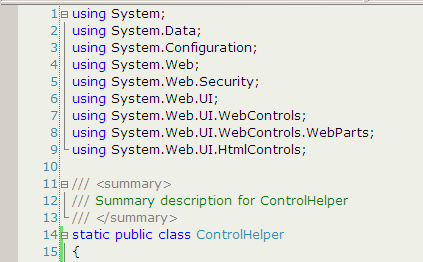
环境:VS2005
字体:Verdana, 10pt
普通文本背景色:238,239,230 (#E6EFEE)
EditPlus 也可以照此配置。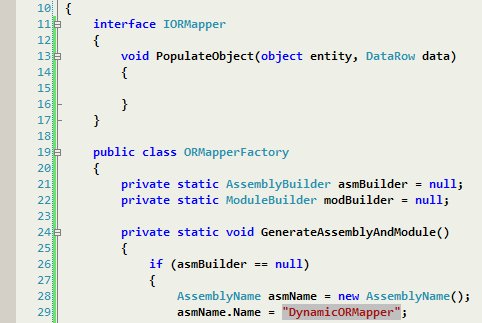
这个是我的最新字体探索结果:
Consolas 10pt bold + ClearType font 支持(XP, 2003)
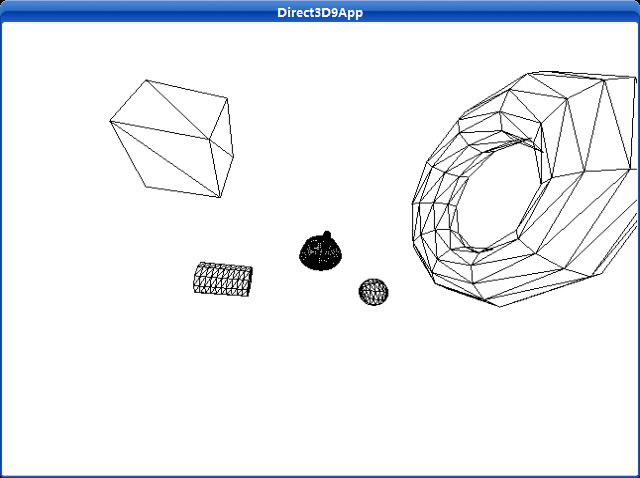
这个程序创建并渲染几种不同的能够使用D3DXCreate*函数创建的3D物体。
Uses a left-handed coordinate system to create a mesh containing an axis-aligned box.
HRESULT D3DXCreateBox(
  LPDIRECT3DDEVICE9 pDevice,
  FLOAT Width,
  FLOAT Height,
  FLOAT Depth,
  LPD3DXMESH * ppMesh,
  LPD3DXBUFFER * ppAdjacency
);
If the function succeeds, the return value is D3D_OK. If the function fails, the return value can be one of the following: D3DERR_INVALIDCALL, D3DXERR_INVALIDDATA, E_OUTOFMEMORY.
The created box is centered at the origin.
This function creates a mesh with the D3DXMESH_MANAGED creation option and D3DFVF_XYZ | D3DFVF_NORMAL flexible vertex format (FVF).
Uses a left-handed coordinate system to create a mesh containing a cylinder.
HRESULT D3DXCreateCylinder(
  LPDIRECT3DDEVICE9 pDevice,
  FLOAT Radius1,
  FLOAT Radius2,
  FLOAT Length,
  UINT Slices,
  UINT Stacks,
  LPD3DXMESH * ppMesh,
  LPD3DXBUFFER * ppAdjacency
);
If the function succeeds, the return value is D3D_OK. If the function fails, the return value can be one of the following: D3DERR_INVALIDCALL, D3DXERR_INVALIDDATA, E_OUTOFMEMORY.
The created cylinder is centered at the origin, and its axis is aligned with the z-axis.
This function creates a mesh with the D3DXMESH_MANAGED creation option and D3DFVF_XYZ | D3DFVF_NORMAL flexible vertex format (FVF).
Uses a left-handed coordinate system to create a mesh containing a torus.
HRESULT D3DXCreateTorus(
  LPDIRECT3DDEVICE9 pDevice,
  FLOAT InnerRadius,
  FLOAT OuterRadius,
  UINT Sides,
  UINT Rings,
  LPD3DXMESH * ppMesh,
  LPD3DXBUFFER * ppAdjacency
);
If the function succeeds, the return value is D3D_OK. If the function fails, the return value can be one of the following: D3DERR_INVALIDCALL, D3DXERR_INVALIDDATA, E_OUTOFMEMORY.
The created torus is centered at the origin, and its axis is aligned with the z-axis. The inner radius of the torus is the radius of the cross-section (the minor radius), and the outer radius of the torus is the radius of the central hole.
This function returns a mesh that can be used later for drawing or manipulation by the application.
This function creates a mesh with the D3DXMESH_MANAGED creation option and D3DFVF_XYZ | D3DFVF_NORMAL flexible vertex format (FVF).
Uses a left-handed coordinate system to create a mesh containing a sphere.
HRESULT D3DXCreateSphere(
  LPDIRECT3DDEVICE9 pDevice,
  FLOAT Radius,
  UINT Slices,
  UINT Stacks,
  LPD3DXMESH * ppMesh,
  LPD3DXBUFFER * ppAdjacency
);
If the function succeeds, the return value is D3D_OK. If the function fails, the return value can be one of the following: D3DERR_INVALIDCALL, D3DXERR_INVALIDDATA, E_OUTOFMEMORY.
The created sphere is centered at the origin, and its axis is aligned with the z-axis.
This function creates a mesh with the D3DXMESH_MANAGED creation option and D3DFVF_XYZ | D3DFVF_NORMAL flexible vertex format (FVF).
Builds a matrix using the specified offsets.
D3DXMATRIX * D3DXMatrixTranslation(
  D3DXMATRIX * pOut,
  FLOAT x,
  FLOAT y,
  FLOAT z
);
Pointer to a D3DXMATRIX structure that contains a translated transformation matrix.
The return value for this function is the same value returned in the pOut parameter. In this way, the D3DXMATRIXTranslation can be used as a parameter for another function.
运行截图:
源程序:
/**************************************************************************************
Renders several D3DX shapes in wireframe mode and has the camera fly around the scene.
Demonstrates the D3DXCreate* functions, and demonstrates more complex transformations
used to position the objects in the world and move the camera around the world.
**************************************************************************************/
#include "d3dUtility.h"
#pragma warning(disable : 4100)
#define TEAPOT_MESH 0
#define BOX_MESH 1
#define CYLINDER_MESH 2
#define TORUS_MESH 3
#define SPHERE_MESH 4
#define NUM_MESH 5
const int WIDTH = 640;
const int HEIGHT = 480;
IDirect3DDevice9* g_d3d_device = NULL;
ID3DXMesh* g_object_meshes[NUM_MESH];
// world matrices for each object.
// these matrices specify the location of the objects in the world.
D3DXMATRIX g_object_world_matrices[NUM_MESH];
////////////////////////////////////////////////////////////////////////////////////////////////////
bool setup()
{
// create the teapot geometry
D3DXCreateTeapot(g_d3d_device, &g_object_meshes[TEAPOT_MESH], NULL);
D3DXCreateBox(g_d3d_device, 2.0f, 2.0f, 2.0f, &g_object_meshes[BOX_MESH], NULL);
D3DXCreateCylinder(g_d3d_device, 1.0f, 1.0f, 3.0f, 10, 10, &g_object_meshes[CYLINDER_MESH], NULL);
D3DXCreateTorus(g_d3d_device, 1.0f, 3.0f, 10, 10, &g_object_meshes[TORUS_MESH], NULL);
D3DXCreateSphere(g_d3d_device, 1.0f, 10, 10, &g_object_meshes[SPHERE_MESH], NULL);
// Build world matrices - position the objects in world space.
// For example, g_object_world_matrices[1] will position g_object_meshes[1] at (-5, 0, 5).
// Likewise, g_object_world_matrices[2] will position g_object_meshes[2] at (5, 0, -5).
D3DXMatrixTranslation(&g_object_world_matrices[TEAPOT_MESH], 0.0f, 0.0f, 0.0f);
D3DXMatrixTranslation(&g_object_world_matrices[BOX_MESH], -5.0f, 0.0f, 5.0f);
D3DXMatrixTranslation(&g_object_world_matrices[CYLINDER_MESH], 5.0f, 0.0f, 5.0f);
D3DXMatrixTranslation(&g_object_world_matrices[TORUS_MESH], -5.0f, 0.0f, -5.0f);
D3DXMatrixTranslation(&g_object_world_matrices[SPHERE_MESH], 5.0f, 0.0f, -5.0f);
// set the projection matrix
D3DXMATRIX proj;
D3DXMatrixPerspectiveFovLH(&proj, D3DX_PI * 0.5f, (float)WIDTH/HEIGHT, 1.0f, 1000.0f);
g_d3d_device->SetTransform(D3DTS_PROJECTION, &proj);
// set wireframe mode render state
g_d3d_device->SetRenderState(D3DRS_FILLMODE, D3DFILL_WIREFRAME);
return true;
}
void cleanup()
{
for(int i = 0; i < NUM_MESH; i++)
safe_release<ID3DXMesh*>(g_object_meshes[i]);
}
bool display(float time_delta)
{
// Animate the camera:
//
// The camera will circle around the center of the scene. We use the sin and cos functions
// to generate points on the circle, then scale them by 10 to further the radius.
// In addition the camera will move up and down as it circles about the scene.
static float angle = (3.0f * D3DX_PI) / 2.0f;
static float camera_height = 0.0f;
static float camera_height_dir = 10.0f;
D3DXVECTOR3 position(cosf(angle) * 10.0f, camera_height, sinf(angle) * 10.0f);
// the camera is targetted at the origin of the world
D3DXVECTOR3 target(0.0f, 0.0f, 0.0f);
// the worlds up vector
D3DXVECTOR3 up(0.0f, 1.0f, 0.0f);
D3DXMATRIX view_matrix;
D3DXMatrixLookAtLH(&view_matrix, &position, &target, &up);
g_d3d_device->SetTransform(D3DTS_VIEW, &view_matrix);
// compute the position for the next frame
angle += time_delta;
if(angle >= 6.28f)
angle = 0.0f;
// compute the height of the camera for the next frame
camera_height += camera_height_dir * time_delta;
if(camera_height >= 20.0f || camera_height <= -20.0f)
camera_height_dir = -camera_height_dir;
// draw the scene
g_d3d_device->Clear(0, NULL, D3DCLEAR_TARGET | D3DCLEAR_ZBUFFER, 0xffffffff, 1.0f, 0);
g_d3d_device->BeginScene();
for(int i = 0; i < NUM_MESH; i++)
{
// set the world matrix that positions the object
g_d3d_device->SetTransform(D3DTS_WORLD, &g_object_world_matrices[i]);
// draw the object using the previously set world matrix
g_object_meshes[i]->DrawSubset(0);
}
g_d3d_device->EndScene();
g_d3d_device->Present(NULL, NULL, NULL, NULL);
return true;
}
LRESULT CALLBACK wnd_proc(HWND hwnd, UINT msg, WPARAM word_param, LPARAM long_param)
{
switch(msg)
{
case WM_DESTROY:
PostQuitMessage(0);
break;
case WM_KEYDOWN:
if(word_param == VK_ESCAPE)
DestroyWindow(hwnd);
break;
}
return DefWindowProc(hwnd, msg, word_param, long_param);
}
int WINAPI WinMain(HINSTANCE inst, HINSTANCE, PSTR cmd_line, int cmd_show)
{
if(! init_d3d(inst, WIDTH, HEIGHT, true, D3DDEVTYPE_HAL, &g_d3d_device))
{
MessageBox(NULL, "init_d3d() - failed.", 0, MB_OK);
return 0;
}
if(! setup())
{
MessageBox(NULL, "Steup() - failed.", 0, MB_OK);
return 0;
}
enter_msg_loop(display);
cleanup();
g_d3d_device->Release();
return 0;
}
Direct3D提供了多种渲染状态,它影响几何物体怎样被渲染。渲染状态有默认值,因此假如你的应用程序需要不同于默认设置的渲染时,你仅仅改变它即可。一种渲染效果会一直起作用,直到你下一次改变渲染状态为止。为了设置一个渲染状态,我们使用下面的方法:
Sets a single device render-state parameter.
HRESULT SetRenderState(
  D3DRENDERSTATETYPE State,
  DWORD Value
);
If the method succeeds, the return value is D3D_OK. D3DERR_INVALIDCALL is returned if one of the arguments is invalid.
例如,在下面的例子中我们将使用线框模式渲染我们的物体。因此,我们设置如下的渲染状态:
_device->SetRenderState(D3DRS_FILLMODE, D3DFILL_WIREFRAME);
注意:查看DirectX SDK中关于D3DRENDERSTATETYPE的信息。其中详细介绍了所有的渲染状态。
一旦我们创建好一个顶点缓存以及一个索引缓存(可选的)后,我们就为渲染其中的内容准备得差不多了,但是在渲染前我们还有3个步骤必须先做。
1、 设置资源流。设置资源流与一个顶点缓存挂钩,此流就是一个流入渲染管线的几何信息的流。
下面的方法是用于设置一个资源流:
HRESULT IDirect3DDevice9::SetStreamSource(
UINT StreamNumber,
IDirect3DVertexBuffer9* pStreamData,
UINT OffsetInBytes,
UINT Stride
);
StreamNumber——确定我们的顶点缓存与哪一个资源流挂钩。我们不使用多重流;因此我们总是使用0号流。
pStreamData——一个指向我们想与流挂钩的那个顶点缓存的指针。
OffsetInBytes——相对流开始处的偏移量。以字节为单位,它指定被填入渲染管线的顶点数据的开始位置。通过检查D3DCAPS9结构中的D3DDEVCAPS2_STREAMOFFSET标志,假如你的设备支持,那么这个参数就有一些非0值。
Stride——我们在顶点缓存中操作的每个部分的流的字节大小。
例如,假设vb是一个已经填充了顶点信息的顶点缓存:
_device->SetStreamSource( 0, vb, 0, sizeof( Vertex ) );
2、 设置索引缓存。假如我们使用了索引缓存,我们必须设置后面要用于绘制操作的索引缓存。每次我们只能使用一个索引缓存;因此假如你需要用一个不同的索引缓存绘制一个物体时,你必须转换到另一个上。下面的代码设置一个索引缓存:
_device->SetIndices( _ib ); // 传递一个索引缓存指针的拷贝
在我们创建好顶点/索引缓存以及做好准备工作以后,我们就能绘制我们的几何物体了。这是通过使用DrawPrimitive或者DrawIndexedPrimitive传送几何信息到达渲染管线。这些方法从顶点流中获得顶点信息以及从索引缓存中获得索引信息。
这个方法不使用索引信息绘制图元。
HRESULT IDirect3DDevice9::DrawPrimitive(
D3DPRIMITIVETYPE PrimitiveType,
UINT StartVertex,
UINT PrimitiveCount
);
PrimitiveType——我们绘制的图元类型。比如,我们能绘制点和线以及三角形。以后我们使用三角形,用D3DPT_TRIANGLELIST参数。
StartVertex——索引到在顶点流中的一个元素。设置渲染顶点中的开始点。这个参数给予我们一定的机动性,可以绘制一个顶点缓存中的某部分。
PrimitiveCount——绘制图元的个数。
例子:
// 绘制4个三角形
_device->DrawPrimitive( D3DPT_TRIANGLELIST, 0, 4);
Renders a sequence of nonindexed, geometric primitives of the specified type from the current set of data input streams.
HRESULT DrawPrimitive(
  D3DPRIMITIVETYPE PrimitiveType,
  UINT StartVertex,
  UINT PrimitiveCount
);
If the method succeeds, the return value is D3D_OK. If the method fails, the return value can be D3DERR_INVALIDCALL.
When converting a legacy application to Direct3D 9, you must add a call to either IDirect3DDevice9::SetFVF to use the fixed function pipeline, or IDirect3DDevice9::SetVertexDeclaration to use a vertex shader before you make any Draw calls.
Defines the primitives supported by Direct3D.
typedef enum D3DPRIMITIVETYPE
{
    D3DPT_POINTLIST = 1,
    D3DPT_LINELIST = 2,
    D3DPT_LINESTRIP = 3,
    D3DPT_TRIANGLELIST = 4,
    D3DPT_TRIANGLESTRIP = 5,
    D3DPT_TRIANGLEFAN = 6,
    D3DPT_FORCE_DWORD = 0x7fffffff,
} D3DPRIMITIVETYPE, *LPD3DPRIMITIVETYPE;
Renders the specified vertices as a sequence of isolated triangles. Each group of three vertices defines a separate triangle.
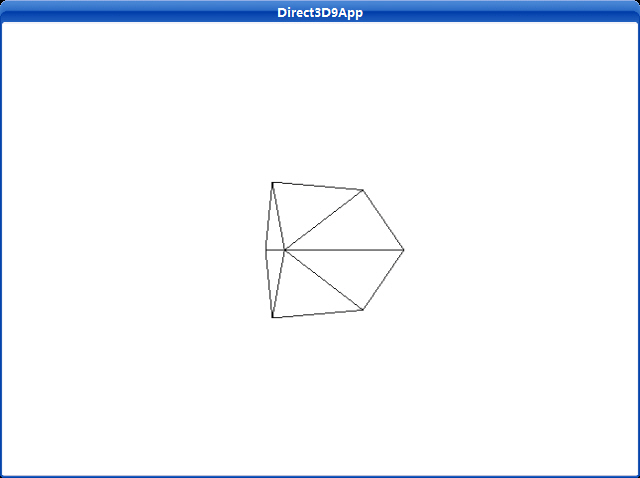
立方体——只比三角形稍微复杂一点,这个程序渲染一个线框立方体。
这个简单的绘制和渲染立方体的程序的运行结果如下图所示:
源程序:
/**************************************************************************************
Renders a spinning cube in wireframe mode. Demonstrates vertex and index buffers,
world and view transformations, render states and drawing commands.
**************************************************************************************/
#include "d3dUtility.h"
#pragma warning(disable : 4100)
const int WIDTH = 640;
const int HEIGHT = 480;
IDirect3DDevice9* g_d3d_device = NULL;
IDirect3DVertexBuffer9* g_vertex_buffer = NULL;
IDirect3DIndexBuffer9* g_index_buffer = NULL;
class cVertex
{
public:
float m_x, m_y, m_z;
cVertex() {}
cVertex(float x, float y, float z)
{
m_x = x;
m_y = y;
m_z = z;
}
};
const DWORD VERTEX_FVF = D3DFVF_XYZ;
////////////////////////////////////////////////////////////////////////////////////////////////////
bool setup()
{
g_d3d_device->CreateVertexBuffer(8 * sizeof(cVertex), D3DUSAGE_WRITEONLY, VERTEX_FVF,
D3DPOOL_MANAGED, &g_vertex_buffer, NULL);
g_d3d_device->CreateIndexBuffer(36 * sizeof(WORD), D3DUSAGE_WRITEONLY, D3DFMT_INDEX16,
D3DPOOL_MANAGED, &g_index_buffer, NULL);
// fill the buffers with the cube data
cVertex* vertices;
g_vertex_buffer->Lock(0, 0, (void**)&vertices, 0);
// vertices of a unit cube
vertices[0] = cVertex(-1.0f, -1.0f, -1.0f);
vertices[1] = cVertex(-1.0f, 1.0f, -1.0f);
vertices[2] = cVertex( 1.0f, 1.0f, -1.0f);
vertices[3] = cVertex( 1.0f, -1.0f, -1.0f);
vertices[4] = cVertex(-1.0f, -1.0f, 1.0f);
vertices[5] = cVertex(-1.0f, 1.0f, 1.0f);
vertices[6] = cVertex( 1.0f, 1.0f, 1.0f);
vertices[7] = cVertex( 1.0f, -1.0f, 1.0f);
g_vertex_buffer->Unlock();
// define the triangles of the cube
WORD* indices = NULL;
g_index_buffer->Lock(0, 0, (void**)&indices, 0);
// front side
indices[0] = 0; indices[1] = 1; indices[2] = 2;
indices[3] = 0; indices[4] = 2; indices[5] = 3;
// back side
indices[6] = 4; indices[7] = 6; indices[8] = 5;
indices[9] = 4; indices[10] = 7; indices[11] = 6;
// left side
indices[12] = 4; indices[13] = 5; indices[14] = 1;
indices[15] = 4; indices[16] = 1; indices[17] = 0;
// right side
indices[18] = 3; indices[19] = 2; indices[20] = 6;
indices[21] = 3; indices[22] = 6; indices[23] = 7;
// top
indices[24] = 1; indices[25] = 5; indices[26] = 6;
indices[27] = 1; indices[28] = 6; indices[29] = 2;
// bottom
indices[30] = 4; indices[31] = 0; indices[32] = 3;
indices[33] = 4; indices[34] = 3; indices[35] = 7;
g_index_buffer->Unlock();
// position and aim the camera
D3DXVECTOR3 position(0.0f, 0.0f, -5.0f);
D3DXVECTOR3 target(0.0f, 0.0f, 0.0f);
D3DXVECTOR3 up(0.0f, 1.0f, 0.0f);
D3DXMATRIX view_matrix;
D3DXMatrixLookAtLH(&view_matrix, &position, &target, &up);
g_d3d_device->SetTransform(D3DTS_VIEW, &view_matrix);
// set the projection matrix
D3DXMATRIX proj;
D3DXMatrixPerspectiveFovLH(&proj, D3DX_PI * 0.5f, (float)WIDTH/HEIGHT, 1.0f, 1000.0f);
g_d3d_device->SetTransform(D3DTS_PROJECTION, &proj);
// set wireframe mode render state
g_d3d_device->SetRenderState(D3DRS_FILLMODE, D3DFILL_WIREFRAME);
return true;
}
void cleanup()
{
safe_release<IDirect3DVertexBuffer9*>(g_vertex_buffer);
safe_release<IDirect3DIndexBuffer9*>(g_index_buffer);
}
bool display(float time_delta)
{
// spin the cube
D3DXMATRIX rx, ry;
// rotate 45 degree on x-axis
D3DXMatrixRotationX(&rx, 3.14f/4.0f);
// increment y-rotation angle each frame
static float y = 0.0f;
D3DXMatrixRotationY(&ry, y);
y += time_delta;
// reset angle to zero when angle reaches 2*PI
if(y >= 6.28f)
y = 0.0f;
// combine x and y axis ratation transformations
D3DXMATRIX rxy = rx * ry;
g_d3d_device->SetTransform(D3DTS_WORLD, &rxy);
// draw the scene
g_d3d_device->Clear(0, NULL, D3DCLEAR_TARGET | D3DCLEAR_ZBUFFER, 0xffffffff, 1.0f, 0);
g_d3d_device->BeginScene();
g_d3d_device->SetStreamSource(0, g_vertex_buffer, 0, sizeof(cVertex));
g_d3d_device->SetIndices(g_index_buffer);
g_d3d_device->SetFVF(VERTEX_FVF);
// draw cube
g_d3d_device->DrawIndexedPrimitive(D3DPT_TRIANGLELIST, 0, 0, 8, 0, 12);
g_d3d_device->EndScene();
g_d3d_device->Present(NULL, NULL, NULL, NULL);
return true;
}
LRESULT CALLBACK wnd_proc(HWND hwnd, UINT msg, WPARAM word_param, LPARAM long_param)
{
switch(msg)
{
case WM_DESTROY:
PostQuitMessage(0);
break;
case WM_KEYDOWN:
if(word_param == VK_ESCAPE)
DestroyWindow(hwnd);
break;
}
return DefWindowProc(hwnd, msg, word_param, long_param);
}
int WINAPI WinMain(HINSTANCE inst, HINSTANCE, PSTR cmd_line, int cmd_show)
{
if(! init_d3d(inst, WIDTH, HEIGHT, true, D3DDEVTYPE_HAL, &g_d3d_device))
{
MessageBox(NULL, "init_d3d() - failed.", 0, MB_OK);
return 0;
}
if(! setup())
{
MessageBox(NULL, "Steup() - failed.", 0, MB_OK);
return 0;
}
enter_msg_loop(display);
cleanup();
g_d3d_device->Release();
return 0;
}
setup函数创建顶点和索引缓存,锁定它们,把构成立方体的顶点写入顶点缓存,以及把定义立方体的三角形的索引写入索引缓存。然后把摄象机向后移动几个单位以便我们能够看见在世界坐标系中原点处被渲染的立方体。
display方法有两个任务;它必须更新场景并且紧接着渲染它。既然想旋转立方体,那么我们将对每一帧增加一个角度使立方体能在这一帧旋转。对于这每一帧,立方体将被旋转一个很小的角度,这样我们看起来旋转就会更平滑。接着我们使用IDirect3DDevice9::DrawIndexedPrimitive方法来绘制立方体。
最后,我们释放使用过的所有内存。这意味着释放顶点和索引缓存接口。
这个程序使用D3DXCreateTeapot函数创建并用DrawSubset函数渲染一个纺纱茶壶。
Uses a left-handed coordinate system to create a mesh containing a teapot.
HRESULT D3DXCreateTeapot(
  LPDIRECT3DDEVICE9 pDevice,
  LPD3DXMESH * ppMesh,
  LPD3DXBUFFER * ppAdjacency
);
If the function succeeds, the return value is D3D_OK. If the function fails, the return value can be one of the following: D3DERR_INVALIDCALL, D3DXERR_INVALIDDATA, E_OUTOFMEMORY.
This function creates a mesh with the D3DXMESH_MANAGED creation option and D3DFVF_XYZ | D3DFVF_NORMAL flexible vertex format (FVF).
Draws a subset of a mesh.
HRESULT DrawSubset(
  DWORD AttribId
);
If the method succeeds, the return value is D3D_OK. If the method fails, the return value can be D3DERR_INVALIDCALL.
The subset that is specified by AttribId will be rendered by the IDirect3DDevice9::DrawIndexedPrimitive method, using the D3DPT_TRIANGLELIST primitive type, so an index buffer must be properly initialized.
An attribute table is used to identify areas of the mesh that need to be drawn with different textures, render states, materials, and so on. In addition, the application can use the attribute table to hide portions of a mesh by not drawing a given attribute identifier (AttribId) when drawing the frame.
截图:
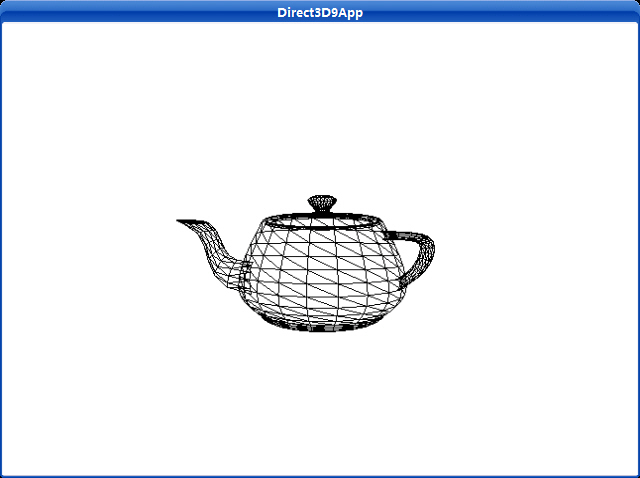
源程序:
/**************************************************************************************
Renders a teapot in wireframe mode. Shows how to create a teapot using the
D3DXCreateTeapot function and how to render the teapot using the ID3DXMesh::DrawSubset
method.
**************************************************************************************/
#include "d3dUtility.h"
#pragma warning(disable : 4100)
const int WIDTH = 640;
const int HEIGHT = 480;
IDirect3DDevice9* g_d3d_device = NULL;
// mesh interface that will store the teapot data and contains method to render the teapot data
ID3DXMesh* g_teapot_mesh = NULL;
////////////////////////////////////////////////////////////////////////////////////////////////////
bool setup()
{
// create the teapot geometry
D3DXCreateTeapot(g_d3d_device, &g_teapot_mesh, NULL);
// position and aim the camera
D3DXVECTOR3 position(0.0f, 0.0f, -3.0f);
D3DXVECTOR3 target(0.0f, 0.0f, 0.0f);
D3DXVECTOR3 up(0.0f, 1.0f, 0.0f);
D3DXMATRIX view_matrix;
D3DXMatrixLookAtLH(&view_matrix, &position, &target, &up);
g_d3d_device->SetTransform(D3DTS_VIEW, &view_matrix);
// set the projection matrix
D3DXMATRIX proj;
D3DXMatrixPerspectiveFovLH(&proj, D3DX_PI * 0.5f, (float)WIDTH/HEIGHT, 1.0f, 1000.0f);
g_d3d_device->SetTransform(D3DTS_PROJECTION, &proj);
// set wireframe mode render state
g_d3d_device->SetRenderState(D3DRS_FILLMODE, D3DFILL_WIREFRAME);
return true;
}
void cleanup()
{
safe_release<ID3DXMesh*>(g_teapot_mesh);
}
bool display(float time_delta)
{
// spin the teapot
D3DXMATRIX ry;
static float y = 0.0f;
D3DXMatrixRotationY(&ry, y);
// increment y-rotation angle each frame
y += time_delta;
// reset angle to zero when angle reaches 2*PI
if(y >= 6.28f)
y = 0.0f;
g_d3d_device->SetTransform(D3DTS_WORLD, &ry);
// draw the scene
g_d3d_device->Clear(0, NULL, D3DCLEAR_TARGET | D3DCLEAR_ZBUFFER, 0xffffffff, 1.0f, 0);
g_d3d_device->BeginScene();
// draw teapot using DrawSubset method with 0 as the argument
g_teapot_mesh->DrawSubset(0);
g_d3d_device->EndScene();
g_d3d_device->Present(NULL, NULL, NULL, NULL);
return true;
}
LRESULT CALLBACK wnd_proc(HWND hwnd, UINT msg, WPARAM word_param, LPARAM long_param)
{
switch(msg)
{
case WM_DESTROY:
PostQuitMessage(0);
break;
case WM_KEYDOWN:
if(word_param == VK_ESCAPE)
DestroyWindow(hwnd);
break;
}
return DefWindowProc(hwnd, msg, word_param, long_param);
}
int WINAPI WinMain(HINSTANCE inst, HINSTANCE, PSTR cmd_line, int cmd_show)
{
if(! init_d3d(inst, WIDTH, HEIGHT, true, D3DDEVTYPE_HAL, &g_d3d_device))
{
MessageBox(NULL, "init_d3d() - failed.", 0, MB_OK);
return 0;
}
if(! setup())
{
MessageBox(NULL, "Steup() - failed.", 0, MB_OK);
return 0;
}
enter_msg_loop(display);
cleanup();
g_d3d_device->Release();
return 0;
}