Rise的自留地

记录生活中的点滴,分享编程技术和游戏开发经验。

0%

使用通告

“通告”是一种触发机制,当缓存中播放位置达到某个固定的位置时,就会向程序发出通知。有了通告,就可以知道播放什么时候结束,这种机制在比较长的声音中特别有效。通告使用一个叫做 IDirectSoundNotify8的对象,这个程序的作用就是在音频缓存中标记一个位置,然后触发事件通知应用程序,而应用程序可以通过消息循环或者单独的线程进行处理。

标记的位置可以是一个缓存中的偏移值,也可以是由宏指定的停止标记,这个表示停止的宏是 DSBPN_OFFSETSTOP。并不是任何偏移值都可以用来作为通告发生的位置,这个值必须和音频的数据块对齐,并且通告的偏移必须按照从小到大的顺序排列。偏移值是不能够共享的,如果使用 DSBPN_OFFSETSTOP宏,它必须被放在最后。举例来说,对于一个块大小为2的音频(单声道、16位),尝试对偏移为4和5的位置设通告会导致失败,因为偏移量位置4和5都在同一个数据块中。

如果要在缓存中使用通告,必须在创建缓存的时候使用 DSBCAPS_CTRLPOSITIONNOTIFY标志,并且如果在创建缓存的过程中使用了这个标志,就必须使用通告对象。如果希望获取 IDirectSoundNotify8对象,可以在IDirectSoundBuffer8对象中通过请求接口来获得。

调整声道平衡

所谓声道平衡就是调节左右声道的大小, DirectSound定义了两个宏帮助把声道平衡调节到最左边和最右边,使用DSBPAN_LEFT将声道调整到最左边,使用DSBPAN_RIGHT 将声道调整到最右边。

通过调用IDirectSoundBuffer8::SetPan函数可以调节声道平衡。

开始使用主音频缓存

让缓存在程序启动的时候开始播放可以节省不少处理器时间。因为内存资源是有限的,特别是在硬件设备中,而你使用的数据缓存可能需要任意大小,因此主音频缓冲区和辅助缓冲区使用环形缓存。因为数据缓冲是一个一维数组,所以可以让这个缓冲区头尾相接。这是一个十分强大的技术,利用这个技术我们可以节省大量的内存。

声音在进行混音处理后,被送入环形主音频缓存。一旦播放位置到达主音频缓存的终点,声音又从头开始播放,这样声音就被无间隙地连续播放。如果想要使用缓存的这种循环特性,需要指定启用循环播放的特性,若不然当播放到缓冲区终点时,播放就停止了。

为了播放缓存中的音频数据(在开启循环选项的情况下播放),需要调用Play函数。

音乐就是一系列的音符,这些音符在不同的时间用不同的幅度被播放或者停止。有非常多的指令被用来播放音乐,但是这些指令的操作基本相同,都在使用各种各样不同的音符。在计算机上进行作曲,实际上是存储了很多组音乐,回放时由音频硬件将这些音符播放出来。

Midi格式(文件扩展名是.MID)是存储数字音乐的标准格式。

DirectMusic 音乐片段(music segments)使用.SGT文件扩展名,其他的相关文件包括乐队文件(band file .BND),这种文件里面包含乐器信息;弦映射表文件(chordmaps file .CDM)包含在回放时修改音乐的和弦指令;样式文件(styles file .STY)包含回放样式信息;模板文件(templates file .TPL)包含创造音乐片段的模板。

Midi是一种非常强大的音乐格式,惟一的不利因素是音乐品质依赖于音乐合成器的性能,因为Midi 仅仅记录了音符,其播放的品质由播放音乐的软硬件决定。MP3文件(文件后缀为.MP3)是一种类似于波表文件的文件格式,但是MP3文件和WAV文件最大的区别在于MP3文件将声音压缩到了最小的程度,但是音质却基本不变。可以用DirectShow组件播放MP3文件,DirectShow组件是一个非常强大的多媒体组件,用DirectShow几乎可以播放任何媒体文件,包括声音和音频文件,部分声音文件我们只能用DirectShow播放。

Direct Audio是一个复合组件,它由DirectSound和DirectMusic两个组件组成,DirectMusic在DirectX8中得到了巨大的增强,但是DirectSound基本保持原有的状态。DirectSound是主要的数字声音回放组件。DirectMusic处理所有的乐曲格式,包括MIDI、DirectMusic本地格式文件和波表文件。DirectMusic处理完之后将它们送入DirectSound中做其他处理,这意味着回放MIDI的时候可以使用数字化的乐器。

使用DirectSound

使用时需要创建一个和声卡通讯的COM对象,用这个COM对象再创造一些独立的声音数据缓冲区(被称之为辅助音频缓冲区 secondary sound buffers)来存储音频数据。缓冲区中的这些数据在主混音缓存(称之为主音频缓存 primary sound buffer)中被混合,然后可以用指定的任何格式播放出来。回放格式通过采样频率、声道数、采样精度排列,可能的采样频率有8000HZ, 11025HZ,22050HZ和44100HZ(CD音质)。

对于声道数可以有两个选择:单通道的单声道声音和双通道的立体声声音。采样精度被限制在两种选择上:8位的低质量声音和16位的高保真声音。在没有修改的情况下,DirectSound主缓冲区的默认设置是22025HZ采样率、8位精度、立体声。在DirectSound中可以调整声音的播放速度(这同样会改变声音的音调),调整音量。循环播放等。甚至还可以在一个虚拟的3D环境中播放,以模拟一个实际环绕在周围的声音。

需要做的是将声音数据充满缓冲区,如果声音数据太大的话,必须创建流播放方法,加载声音数据中的一小块,当这一小块播放完毕以后,再加载另外的小块数据进缓冲区,一直持续这个过程,直到声音被处理完毕。在缓冲区中调整播放位置可以实现流式音频,当播放完成通知应用程序更新音频数据。这个通知更新的过程我们称之为“通告”。在同一时间被播放的缓存数目虽然没有限制,但是仍然需要保证缓冲区数目不要太多,因为每增加一个缓冲区,就要消耗很多内存和CPU资源。

在项目中使用DirectSound和DirectMusic,需要添加头文件dsound.h和dmsuic.h,并且需要链接DSound.lib到包含库中,添加DXGuid.lib库可以让DirectSound更容易使用。

以下是DirectSound COM接口:

IDirectSound8:DirectSound接口。
IDirectSoundBuffer8:主缓冲区和辅助缓冲区接口,保存数据并控制回放。
IDirectSoundNotify8:通知对象,通知应用程序指定播放位置已经达到。

IDirectSound8是主接口,用它来创建缓冲区(IDirectSoundBuffer8),然后用缓冲区接口创建通告接口(IDirectSoundNotify8),通告接口告诉应用程序指定的位置已经到达,通告接口在流化音频文件时非常有用。

初始化DirectSound

使用 DirectSound的第一步是创建IDirectSound8对象,IDirectSound8起到控制音频硬件设备的作用,可以通过 DirectSoundCreate8函数来创建。

除了指定的是鼠标标识符以及鼠标数据格式外,初始化鼠标就和初始化键盘几乎完全相同。

//--------------------------------------------------------------------------------
// Initialize mouse interface, return a mouse interface pointer.
//--------------------------------------------------------------------------------
IDirectInputDevice8* Init_Mouse(HWND hwnd, IDirectInput8* directinput)
{
    IDirectInputDevice8
* directinput_device;

    
// create the device object
    if(FAILED(directinput->CreateDevice(GUID_SysMouse, &directinput_device, NULL)))
        
return NULL;

    
// set the data format
    if(FAILED(directinput_device->SetDataFormat(&c_dfDIMouse)))
    {
        directinput_device
->Release();
        
return NULL;
    }

    
// set the coooperative mode
    if(FAILED(directinput_device->SetCooperativeLevel(hwnd, DISCL_FOREGROUND | DISCL_NONEXCLUSIVE)))
    {
        directinput_device
->Release();
        
return NULL;
    }

    
// acquire the device for use
    if(FAILED(directinput_device->Acquire()))
    {
        directinput_device
->Release();
        
return NULL;
    }

    
// everything well, so return a vaild pointer.
    return directinput_device;
}

要调用DirectInputDevice8::GetDeviceState,使用诸如相对移动和按键状态等鼠标的相关信息来填充 DIMOUSESTATE结构体。

DIMOUSESTATE结构体的定义如下:

Describes the state of a mouse device that has up to four buttons, or another device that is being accessed as if it were a mouse device. This structure is used with the IDirectInputDevice8::GetDeviceState method.

Syntax

typedef struct DIMOUSESTATE {
    LONG lX;
    LONG lY;
    LONG lZ;
    BYTE rgbButtons[4];
} DIMOUSESTATE, *LPDIMOUSESTATE;

Members

lX
X-axis.

lY
Y-axis.

lZ
Z-axis, typically a wheel. If the mouse does not have a z-axis, the value is 0.

rgbButtons
Array of buttons. The high-order bit of the byte is set if the corresponding button is down.

Remarks

You must prepare the device for mouse-style access by calling the IDirectInputDevice8::SetDataFormat method, passing the c_dfDIMouse global data format variable.

The mouse is a relative-axis device, so the absolute axis positions for mouse axes are accumulated relative motion. Therefore, the value of the absolute axis position is not meaningful except in comparison with other absolute axis positions.

If an axis is in relative mode, the appropriate member contains the change in position. If it is in absolute mode, the member contains the absolute axis position.

点击下载源码和工程

完整源码示例:

/***************************************************************************************
PURPOSE:
    Mouse device Demo
 **************************************************************************************
*/

#define DIRECTINPUT_VERSION 0x0800

#include 
<windows.h>
#include 
<stdio.h>
#include 
<dinput.h>
#include 
"resource.h"

#pragma comment(lib, 
"dxguid.lib")
#pragma comment(lib, 
"dinput8.lib")

#pragma warning(disable : 
4996)

#define Safe_Release(p) if((p)) (p)->Release();

// window handles, class and caption text.
HWND g_hwnd;
char g_class_name[] = "MouseClass";

IDirectInput8
* g_directinput;               // directinput component
IDirectInputDevice8* g_directinput_device;  // mouse device

//--------------------------------------------------------------------------------
// Window procedure.
//--------------------------------------------------------------------------------
long WINAPI Window_Proc(HWND hwnd, UINT msg, WPARAM wParam, LPARAM lParam)
{
    
switch(msg)
    {
    
case WM_DESTROY:
        PostQuitMessage(
0);
        
return 0;
    }

    
return (long) DefWindowProc(hwnd, msg, wParam, lParam);
}

//--------------------------------------------------------------------------------
// Initialize mouse interface, return a mouse interface pointer.
//--------------------------------------------------------------------------------
IDirectInputDevice8* Init_Mouse(HWND hwnd, IDirectInput8* directinput)
{
    IDirectInputDevice8
* directinput_device;

    
// create the device object
    if(FAILED(directinput->CreateDevice(GUID_SysMouse, &directinput_device, NULL)))
        
return NULL;

    
// set the data format
    if(FAILED(directinput_device->SetDataFormat(&c_dfDIMouse)))
    {
        directinput_device
->Release();
        
return NULL;
    }

    
// set the coooperative mode
    if(FAILED(directinput_device->SetCooperativeLevel(hwnd, DISCL_FOREGROUND | DISCL_NONEXCLUSIVE)))
    {
        directinput_device
->Release();
        
return NULL;
    }

    
// acquire the device for use
    if(FAILED(directinput_device->Acquire()))
    {
        directinput_device
->Release();
        
return NULL;
    }

    
// everything well, so return a vaild pointer.
    return directinput_device;
}

//--------------------------------------------------------------------------------
// Read mouse buffer.
//--------------------------------------------------------------------------------
BOOL Read_Device(IDirectInputDevice8* directinput_device, void* buffer, long buffer_size)
{
    HRESULT rv;

    
while(1)
    {
        
// poll device
        g_directinput_device->Poll();

        
// read in state
        if(SUCCEEDED(rv = g_directinput_device->GetDeviceState(buffer_size, buffer)))
            
break;

        
// return when an unknown error
        if(rv != DIERR_INPUTLOST || rv != DIERR_NOTACQUIRED)
            
return FALSE;

        
// re-acquire and try again
        if(FAILED(g_directinput_device->Acquire()))
            
return FALSE;
    }

    
return TRUE;
}

//--------------------------------------------------------------------------------
// Main function, routine entry.
//--------------------------------------------------------------------------------
int WINAPI WinMain(HINSTANCE inst, HINSTANCE, LPSTR cmd_line, int cmd_show)
{
    WNDCLASS        win_class;
    MSG             msg;
    DIMOUSESTATE    mouse_state 
= {0};
    
char            text[256];
    
long            x_pos = 0, y_pos = 0;

    
// create window class and register it
    win_class.style         = CS_HREDRAW | CS_VREDRAW;
    win_class.lpfnWndProc   
= Window_Proc;
    win_class.cbClsExtra    
= 0;
    win_class.cbWndExtra    
= DLGWINDOWEXTRA;
    win_class.hInstance     
= inst;
    win_class.hIcon         
= LoadIcon(inst, IDI_APPLICATION);
    win_class.hCursor       
= LoadCursor(NULL, IDC_ARROW);
    win_class.hbrBackground 
= (HBRUSH) (COLOR_BTNFACE + 1);
    win_class.lpszMenuName  
= NULL;
    win_class.lpszClassName 
= g_class_name;    

    
if(! RegisterClass(&win_class))
        
return FALSE;

    
// create the main window
    g_hwnd = CreateDialog(inst, MAKEINTRESOURCE(IDD_MOUSE), 0, NULL);

    ShowWindow(g_hwnd, cmd_show);
    UpdateWindow(g_hwnd);

    
// initialize directinput and get keyboard device
    DirectInput8Create(inst, DIRECTINPUT_VERSION, IID_IDirectInput8, (void **) &g_directinput, NULL);

    
// initialize mouse
    g_directinput_device = Init_Mouse(g_hwnd, g_directinput);

    
// start message pump, waiting for signal to quit.
    ZeroMemory(&msg, sizeof(MSG));

    
while(msg.message != WM_QUIT)
    {
        
if(PeekMessage(&msg, NULL, 0, 0, PM_REMOVE))
        {
            TranslateMessage(
&msg);
            DispatchMessage(
&msg);
        }
        
        
// read in mouse and display coordinates
        Read_Device(g_directinput_device, &mouse_state, sizeof(DIMOUSESTATE));

        x_pos 
+= mouse_state.lX;
        y_pos 
+= mouse_state.lY;

        
if(mouse_state.lX != 0 || mouse_state.lY != 0)
        {
            sprintf(text, 
"%ld, %ld", x_pos, y_pos);
            SetWindowText(GetDlgItem(g_hwnd, IDC_COORDINATES), text);
        }
    }

    
// release directinput objects
    g_directinput_device->Unacquire();
    g_directinput_device
->Release();
    g_directinput
->Release();

    UnregisterClass(g_class_name, inst);
    
    
return (int) msg.wParam;
}

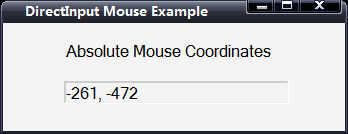
运行截图:


设置数据格式

每种设备都有一种用于读取数据的特定数据格式,需要考虑的东西也很多,包括键、鼠标按键、轴等。因此要使程序从设备读取数据,首先必须告诉DirectInput读取这种数据所采用的格式。通过 IDirectInputDevice8::SetDataFormat函数即可满足上述要求。

Sets the data format for the Microsoft DirectInput device.

Syntax

HRESULT SetDataFormat(LPCDIDATAFORMAT lpdf);

Parameters

lpdf
Address of a structure that describes the format of the data that the DirectInputDevice should return. An application can define its own DIDATAFORMAT structure or use one of the following predefined global variables:
 
c_dfDIKeyboard
c_dfDIMouse
c_dfDIMouse2
c_dfDIJoystick
c_dfDIJoystick2

Return Value

If the method succeeds, the return value is DI_OK.

If the method fails, the return value can be one of the following error values:

DIERR_ACQUIRED The operation cannot be performed while the device is acquired.
DIERR_INVALIDPARAM An invalid parameter was passed to the returning function, or the object was not in a state that permitted the function to be called. This value is equal to the E_INVALIDARG standard Component Object Model (COM) return value.
DIERR_NOTINITIALIZED The object has not been initialized.

Remarks

The data format must be set before the device can be acquired by using the IDirectInputDevice8::Acquire method. It is necessary to set the data format only once. The data format cannot be changed while the device is acquired.

If the application is using action mapping, the data format is set instead by the call to IDirectInputDevice8::SetActionMap.

SetDataFormat函数只有一个参数,这个参数是一个指向DIDATAFORMAT结构体的指针,此结构体的定义如下:

Describes a device’s data format. This structure is used with the IDirectInputDevice8::SetDataFormat method.

Syntax

typedef struct DIDATAFORMAT {
    DWORD dwSize;
    DWORD dwObjSize;
    DWORD dwFlags;
    DWORD dwDataSize;
    DWORD dwNumObjs;
    LPDIOBJECTDATAFORMAT rgodf;
} DIDATAFORMAT, *LPDIDATAFORMAT;
 
typedef const DIDATAFORMAT *LPCDIDATAFORMAT;

Members

dwSize
Size of this structure, in bytes.

dwObjSize
Size of the DIOBJECTDATAFORMAT structure, in bytes.

dwFlags
Flags describing other attributes of the data format. This value can be one of the following:

DIDF_ABSAXIS
The axes are in absolute mode. Setting this flag in the data format is equivalent to manually setting the axis mode property, using the IDirectInputDevice8::SetProperty method. This cannot be combined with DIDF_RELAXIS flag.

DIDF_RELAXIS
The axes are in relative mode. Setting this flag in the data format is equivalent to manually setting the axis mode property using the IDirectInputDevice8::SetProperty method. This cannot be combined with the DIDF_ABSAXIS flag.

dwDataSize
Size of a data packet returned by the device, in bytes. This value must be a multiple of 4 and must exceed the largest offset value for an object’s data within the data packet.

dwNumObjs
Number of objects in the rgodf array.

rgodf
Address to an array of DIOBJECTDATAFORMAT structures. Each structure describes how one object’s data should be reported in the device data. Typical errors include placing two pieces of information in the same location and placing one piece of information in more than one location.

Remarks

Applications do not typically need to create a DIDATAFORMAT structure. An application can use one of the predefined global data format variables, c_dfDIMouse, c_dfDIMouse2, c_dfDIKeyboard, c_dfDIJoystick, or c_dfDIJoystick2.

Applications that need to create a DIDATAFORMAT structure must first call IDirectInputDevice8::EnumObjects to determine the available objects for the current device. This is because the IDirectInputDevice8::SetDataFormat method will return DIERR_INVALIDPARAM if an an object is described in the DIDATAFORMAT structure but does not exist on the current device.

设置协作级别

首先必须面对一个事实,那就是每个程序都会使用许多输入设备。几乎每个程序都会使用键盘和鼠标,同时某些程序还会使用游戏杆。在处理的时候,必须同其他可能仍在运行的应用程序共享对这些设备的访问,或者应用程序独占对设备的所有访问,这样除非该应用程序结束了对设备的访问,否则就不允许其他应用程序控制这些设备。

设置协作级别的函数是IDirectInputDevice8::SetCooperativeLevel。

Establishes the cooperative level for this instance of the device. The cooperative level determines how this instance of the device interacts with other instances of the device and the rest of the system.

Syntax

HRESULT SetCooperativeLevel(HWND hwnd,
    DWORD dwFlags
);

Parameters

hwnd
Window handle to be associated with the device. This parameter must be a valid top-level window handle that belongs to the process. The window associated with the device must not be destroyed while it is still active in a Microsoft DirectInput device.

dwFlags
Flags that describe the cooperative level associated with the device. The following flags are defined:

DISCL_BACKGROUND
The application requires background access. If background access is granted, the device can be acquired at any time, even when the associated window is not the active window.

DISCL_EXCLUSIVE
The application requires exclusive access. If exclusive access is granted, no other instance of the device can obtain exclusive access to the device while it is acquired. However, nonexclusive access to the device is always permitted, even if another application has obtained exclusive access.

An application that acquires the mouse or keyboard device in exclusive mode should always unacquire the devices when it receives WM_ENTERSIZEMOVE and WM_ENTERMENULOOP messages. Otherwise, the user cannot manipulate the menu or move and resize the window.

DISCL_FOREGROUND
The application requires foreground access. If foreground access is granted, the device is automatically unacquired when the associated window moves to the background.

DISCL_NONEXCLUSIVE
The application requires nonexclusive access. Access to the device does not interfere with other applications that are accessing the same device.

DISCL_NOWINKEY
Disable the Microsoft Windows logo key. Setting this flag ensures that the user cannot inadvertently break out of the application. Note, however, that DISCL_NOWINKEY has no effect when the default action mapping user interface (UI) is displayed, and the Windows logo key will operate normally as long as that UI is present.

Return Value

If the method succeeds, the return value is DI_OK.

If the method fails, the return value can be one of the following error values:

DIERR_INVALIDPARAM An invalid parameter was passed to the returning function, or the object was not in a state that permitted the function to be called. This value is equal to the E_INVALIDARG standard Component Object Model (COM) return value.
DIERR_NOTINITIALIZED The object has not been initialized.
E_HANDLE The HWND parameter is not a valid top-level window that belongs to the process.

Remarks

Applications must specify either DISCL_FOREGROUND or DISCL_BACKGROUND; it is an error to specify both or neither. Similarly, applications must specify either DISCL_EXCLUSIVE or DISCL_NONEXCLUSIVE.

If the system mouse is acquired in exclusive mode, the pointer is removed from the screen until the device is unacquired. This applies only to a mouse created by passing GUID_SysMouse to IDirectInput8::CreateDevice.

Applications that select the background exclusive mode cooperative level are not guaranteed to retain access to the device if another application requests exclusive access. When a background exclusive mode application loses access, calls to DirectInput device methods will fail and return DIERR_NOTACQUIRED. The application can regain access to the device by manually unacquiring the device and reaquiring it.

Applications must call this method before acquiring the device by using the IDirectInputDevice8::Acquire method.

设置特殊属性

设置设备的特殊属性,包括轴模式(axis mode),缓冲区(buffering)以及最大最小范围。对于轴模式,有两个选择:相对和绝对。绝对模式基于一个中心坐标来报告坐标。位于这个点左边或上面的值都报告成负值,同时位于这个点右边或下面的值都报告成正值。相对坐标就是当前位置同上一个位置之间的距离差。

最后一个特殊性属性是设备的最小和最大范围设置。举例来说,将游戏杆推动到最左边就会产生最小值,而推动到最右边就会产生最大值。这两边产生何种值取决于具体的设置,只有游戏杆才会涉及到最小和最大范围设置。

用于设置特殊属性的函数是 IDirectInputDevice8::SetProperty。

Sets properties that define the device behavior. These properties include input buffer size and axis mode.

Syntax

HRESULT SetProperty(REFGUID rguidProp,
    LPCDIPROPHEADER pdiph
);

Parameters

rguidProp
Reference to (C++) or address of (C) the globally unique identifier (GUID) identifying the property to be set. This can be one of the predefined values, or a pointer to a GUID that identifies the property. The following property values are predefined for an input device:

DIPROP_APPDATA
Sets the application-defined value associated with an in-game action, as a DIPROPPOINTER.

DIPROP_AUTOCENTER
Specifies whether device objects are self centering. This setting applies to the entire device, rather than to any particular object, so the dwHow member of the associated DIPROPDWORD structure must be DIPH_DEVICE.
The dwData member can be one of the following values.

DIPROPAUTOCENTER_OFF: The device should not automatically center when the user releases the device. An application that uses force feedback should disable autocentering before playing effects.

DIPROPAUTOCENTER_ON: The device should automatically center when the user releases the device.

Not all devices support the autocenter property.

DIPROP_AXISMODE
Sets the axis mode. The value being set (DIPROPAXISMODE_ABS or DIPROPAXISMODE_REL) must be specified in the dwData member of the associated DIPROPDWORD structure. See the description of the pdiph parameter for more information.

This setting applies to the entire device, so the dwHow member of the associated DIPROPDWORD structure must be set to DIPH_DEVICE.

DIPROP_BUFFERSIZE
Sets the input buffer size. The value being set must be specified in the dwData member of the associated DIPROPDWORD structure. See Remarks. This setting applies to the entire device, so the dwHow member of the associated DIPROPDWORD structure must be set to DIPH_DEVICE.

DIPROP_CALIBRATION
Predefined property that allows the application to access the information that Microsoft DirectInput uses to manipulate axes that require calibration. This property exists primarily for applications of the control panel type. Normal applications should not need to deal with calibration information.
You can access the calibration mode property for an axis by setting the dwHow member of the DIPROPHEADER structure to DIPH_BYID or to DIPH_BYOFFSET and setting the dwObj member to the object identifier (ID) or offset, respectively.

Control panel applications that set new calibration data must also invoke the IDirectInputJoyConfig::SendNotify method to notify other applications of the change in calibration. For more information about IDirectInputJoyConfig::SendNotify, see the Microsoft DirectX Driver Development Kit (DDK).

DIPROP_CALIBRATIONMODE
Enables the application to specify whether DirectInput should retrieve calibrated or uncalibrated data from an axis. By default, DirectInput retrieves calibrated data.
Setting the calibration mode for the entire device is equivalent to setting it for each axis individually.

The dwData member of the DIPROPDWORD structure can be one of the following values:

DIPROPCALIBRATIONMODE_COOKED: DirectInput should return data after applying calibration information. This is the default mode.
DIPROPCALIBRATIONMODE_RAW: DirectInput should return raw, uncalibrated data. This mode is typically used only by applications of the control panel type. Note that raw data might include negative values.

Setting a device into raw mode causes the dead zone, saturation, and range settings to be ignored.

DIPROP_CPOINTS
Sets calibration points used for the adjustment of incoming raw data. The values being set must be specified as CPOINT types in the cp array of the associated DIPROPCPOINTS structure. This setting applies to individual device objects, so the dwHow member of the associated DIPROPHEADER structure must be set to either DIPH_BYID or DIPH_BYOFFSET.

DIPROP_DEADZONE
Sets the value for the dead zone of a joystick, in the range from 0 through 10,000, where 0 indicates that there is no dead zone, 5,000 indicates that the dead zone extends over 50 percent of the physical range of the axis on both sides of center, and 10,000 indicates that the entire physical range of the axis is dead. When the axis is within the dead zone, it is reported as being at the center of its range. This setting can be applied to either the entire device or to a specific axis.

DIPROP_FFGAIN
Sets the gain for the device. This setting applies to the entire device, rather than to any particular object, so the dwHow member of the associated DIPROPDWORD structure must be DIPH_DEVICE.
The dwData member contains a gain value that is applied to all effects created on the device. The value is an integer in the range from 0 through 10,000, specifying the amount by which effect magnitudes should be scaled for the device. For example, a value of 10,000 indicates that all effect magnitudes are to be taken at face value. A value of 9,000 indicates that all effect magnitudes are to be reduced to 90 percent of their nominal magnitudes.

DirectInput always checks the gain value before setting the gain property. If the gain is outside of the range (less than zero or greater than 10,000), IDirectInputDevice8::SetProperty will return DIERR_INVALIDPARAM. Otherwise, if successful, it will return DI_OK, even if the device does not support force feedback.

Setting a gain value is useful when an application wants to scale down the strength of all force-feedback effects uniformly, based on user preferences.

Unlike other properties, the gain can be set when the device is in an acquired state.

DIPROP_INSTANCENAME
This property exists for advanced applications that want to change the friendly instance name of a device (as returned in the tszInstanceName member of the DIDEVICEINSTANCE structure) to distinguish it from similar devices that are plugged in simultaneously. Most applications should have no need to change the friendly name.
This setting applies to the entire device, so the dwHow member of the associated DIPROPDWORD structure must be set to DIPH_DEVICE.

The pdiph parameter must be a pointer to the diph member of a DIPROPSTRING structure.

DIPROP_PRODUCTNAME
This property exists for advanced applications that want to change the friendly product name of a device (as returned in the tszProductName member of the DIDEVICEINSTANCE structure) to distinguish it from similar devices which are plugged in simultaneously. Most applications should have no need to change the friendly name.
This setting applies to the entire device, so the dwHow member of the associated DIPROPDWORD structure must be set to DIPH_DEVICE.

The pdiph parameter must be a pointer to the diph member of a DIPROPSTRING structure.

Setting the product name is only useful for changing the user-defined name of an analog joystick on Microsoft Windows 98,Windows 2000, and Windows Millennium Edition (Windows Me) computers. In other cases, attempting to set this property will still return DI_OK. However, the name is not stored in a location used by IDirectInputDevice8::GetProperty.

DIPROP_RANGE
Sets the range of values an object can possibly report. The minimum and maximum values are taken from the lMin and lMax members of the associated DIPROPRANGE structure.
For some devices, this is a read-only property.

You cannot set a reverse range; lMax must be greater than lMin.

DIPROP_SATURATION
Sets the value for the saturation zones of a joystick, in the range from 0 through 10,000. The saturation level is the point at which the axis is considered to be at its most extreme position. For example, if the saturation level is set to 9,500, the axis reaches the extreme of its range when it has moved 95 percent of the physical distance from its center position (or from the dead zone). This setting can be applied to either the entire device or a specific axis.

pdiph
Address of the DIPROPHEADER structure contained within the type-specific property structure.

Return Value

If the method succeeds, the return value is DI_OK or DI_PROPNOEFFECT.

If the method fails, the return value can be one of the following error values.

DIERR_INVALIDPARAM An invalid parameter was passed to the returning function, or the object was not in a state that permitted the function to be called. This value is equal to the E_INVALIDARG standard Component Object Model (COM) return value.
DIERR_NOTINITIALIZED The object has not been initialized.
DIERR_OBJECTNOTFOUND The requested object does not exist.
DIERR_UNSUPPORTED The function called is not supported at this time. This value is equal to the E_NOTIMPL standard COM return value.

Remarks

The buffer size determines the amount of data that the buffer can hold between calls to the IDirectInputDevice8::GetDeviceData method before data is lost. This value may be set to 0 to indicate that the application does not read buffered data from the device. If the buffer size in the dwData member of the DIPROPDWORD structure is too large for the device to support it, then the largest possible buffer size is set.

在调用SetProperty函数时始终要使用的DIPROPHEADER结构体定义如下:

Serves as a header for all property structures.

Syntax

typedef struct DIPROPHEADER {
    DWORD    dwSize;
    DWORD    dwHeaderSize;
    DWORD    dwObj;
    DWORD    dwHow;
} DIPROPHEADER, *LPDIPROPHEADER;
 
typedef const DIPROPHEADER *LPCDIPROPHEADER;

Members

dwSize
Size of the enclosing structure. This member must be initialized before the structure is used.

dwHeaderSize
Size of the DIPROPHEADER structure.

dwObj
Object for which the property is to be accessed. The value set for this member depends on the value specified in the dwHow member.

dwHow
Value that specifies how the dwObj member should be interpreted. This value can be one of the following:

DIPH_DEVICE
The dwObj member must be 0.

DIPH_BYOFFSET
The dwObj member is the offset into the current data format of the object whose property is being accessed.

DIPH_BYUSAGE
The dwObj member is the HID usage page and usage values in packed form.

DIPH_BYID
The dwObj member is the object type/instance identifier. This identifier is returned in the dwType member of the DIDEVICEOBJECTINSTANCE structure returned from a previous call to the IDirectInputDevice8::EnumObjects member.

获得设备

在使用任何设备之前,首先必须获得设备。只有获得了设备才能确保程序能够访问设备,以及同其他程序共享访问还是完全控制设备。要注意的是其他程序可能会争夺并抢走对设备的控制权,要补救这种情况就必须重新获得设备。何时必须获得设备?第一种情况就是在创建接口的时候,原因在于使用设备之前必须首先获得它。另一种情况就是当另一个程序抢走了对设备的控制,同时 DirectInput通知了程序时。

调用IDirectInputDevice8::Acquire函数即可获得设备。

Obtains access to the input device.

Syntax

HRESULT Acquire(VOID);

Return Value

If the method succeeds, the return value is DI_OK, or S_FALSE if the device was already acquired.

If the method fails, the return value can be one of the following error values.

DIERR_INVALIDPARAM An invalid parameter was passed to the returning function, or the object was not in a state that permitted the function to be called. This value is equal to the E_INVALIDARG standard Component Object Model (COM) return value.
DIERR_NOTINITIALIZED The object has not been initialized.
DIERR_OTHERAPPHASPRIO Another application has a higher priority level, preventing this call from succeeding. This value is equal to the E_ACCESSDENIED standard COM return value. This error can be returned when an application has only foreground access to a device but is attempting to acquire the device while in the background.

Remarks

Before a device can be acquired, a data format must be set by using the IDirectInputDevice8::SetDataFormat method or IDirectInputDevice8::SetActionMap method. If the data format has not been set, IDirectInputDevice8::Acquire returns DIERR_INVALIDPARAM.

Devices must be acquired before calling the IDirectInputDevice8::GetDeviceState or IDirectInputDevice8::GetDeviceData methods for that device.

Device acquisition does not use a reference count. Therefore, if an application calls the IDirectInputDevice8::Acquire method twice, then calls the IDirectInputDevice8::Unacquire method once, the device is unacquired.

If IDirectInputDevice8::BuildActionMap succeeds but no actions have been mapped, a subsequent call to IDirectInputDevice8::SetActionMap will return DI_OK but a call to IDirectInputDevice8::Acquire will fail with DIERR_INVALIDPARAM.

轮询设备

轮询可以准备设备并在合适的情况下读取设备数据,因为数据可能具有临界时间。游戏杆就是这样的设备,要从设备读取数据,计算机需要发送一个电子脉冲给它。虽然轮询对于游戏杆输入而言是必须的,但是对键盘或鼠标来说却并不需要轮询。

轮询设备需要使用IDirectInputDevice8::Poll函数。

Retrieves data from polled objects on a Microsoft DirectInput device. If the device does not require polling, calling this method has no effect. If a device that requires polling is not polled periodically, no new data is received from the device. Calling this method causes DirectInput to update the device state, generate input events (if buffered data is enabled), and set notification events (if notification is enabled).

Syntax

HRESULT Poll(VOID);

Return Value

If the method succeeds, the return value is DI_OK, or DI_NOEFFECT if the device does not require polling.

If the method fails, the return value can be one of the following error values:

DIERR_INPUTLOST Access to the input device has been lost. It must be reacquired.
DIERR_NOTACQUIRED The operation cannot be performed unless the device is acquired.
DIERR_NOTINITIALIZED The object has not been initialized.

Remarks

Before a device data can be polled, the data format must be set by using the IDirectInputDevice8::SetDataFormat or IDirectInputDevice8::SetActionMap method, and the device must be acquired by using the IDirectInputDevice8::Acquire method.

读取数据

经过以上的步骤,就剩下最后一步了,那就是使用 IDirectInputDevice8::GetDeviceState函数读取设备数据。为了存储设备的信息,必须传递一个数据缓冲区给此函数,这样程序才能使用设备的信息,每种设备的数据各不相同。

Retrieves immediate data from the device.

Syntax

HRESULT GetDeviceState(DWORD cbData,
    LPVOID lpvData
);

Parameters

cbData
Size of the buffer in the lpvData parameter, in bytes.

lpvData
Address of a structure that receives the current state of the device. The format of the data is established by a prior call to the IDirectInputDevice8::SetDataFormat method.

Return Value

If the method succeeds, the return value is DI_OK.

If the method fails, the return value can be one of the following error values:

DIERR_INPUTLOST Access to the input device has been lost. It must be reacquired.

DIERR_INVALIDPARAM An invalid parameter was passed to the returning function, or the object was not in a state that permitted the function to be called. This value is equal to the E_INVALIDARG standard Component Object Model (COM) return value.

DIERR_NOTACQUIRED The operation cannot be performed unless the device is acquired.

DIERR_NOTINITIALIZED The object has not been initialized.

E_PENDING Data is not yet available.

Remarks

Before device data can be obtained, set the cooperative level by using the IDirectInputDevice8::SetCooperativeLevel method, then set the data format by using IDirectInputDevice8::SetDataFormat, and acquire the device by using the IDirectInputDevice8::Acquire method.

The five predefined data formats require corresponding device state structures according to the following table:

Data format State structure
c_dfDIMouse DIMOUSESTATE
c_dfDIMouse2 DIMOUSESTATE2
c_dfDIKeyboard array of 256 bytes
c_dfDIJoystick DIJOYSTATE
c_dfDIJoystick2 DIJOYSTATE2

For example, if you passed the c_dfDIMouse format to the IDirectInputDevice8::SetDataFormat method, you must pass a DIMOUSESTATE structure to the IDirectInputDevice8::GetDeviceState method.

无论是哪种设备,下面的代码都能读取其数据。它们考虑了丢失设备并在适当的时刻重新获得设备的情况,必须传递一个指向缓冲区的指针给下面这个函数,缓冲区的大小要能够保存设备信息以及读取的数据量。
  很多中国人对中药充满了自信、中药也给他们带来很多“安全感”。这有些互惠互利的感觉:你相信我,我就给你安全感,而且让你担心一旦没有中医中药,中国一定会亡国亡种。这已经不是药了,也不是医学了,仿佛是中国人的寄主和守护神,而中国人则是中医中药的寄生虫。我又要批评那些支持中医的人数典忘祖了。在神农之前,生活在这片神奇土地上的原始人难道不是人么,怎么可以抹去中国没有中医的那段历史,原始中国人在山顶洞河姆渡男的狩猎女的采集的历史,你们怎么可以数典忘祖,轻松抹去中国原始人类没有中医的100多万年的历史?咦,原来没有中医,中国人居然也可以活下来,不但没亡种,而且还可以一直进化呢。中国人是突然蹦出来的么,是先有中医还是先有中国人?这道理就跟上帝造人说一样简单。先有了人类,人类再意淫出了上帝造人说。先有了中国人才有中医,中医是为了中国人活得更好而存在,当中医不再适应时代要求,则被残酷的淘汰。

DirectInput是一些COM对象的集合(和所有DirectX组件相同),这些COM对象描绘了输入系统和各个输入设备。最主要的对象是DirectInput8,它用于初始化系统以及创建输入设备接口。

DirectInput COM对象:

IDirectInput8:主要的DirectInput8 COM接口,其他所有接口都通过这个接口进行查询。
DirectInputDevice8:用于输入设备的COM接口,每个设备都有自己单独的接口可供使用。
DirectInputEffect:用于力反馈效果的 COM接口,比如某些游戏杆和某些鼠标上的力反馈效果。

各种输入设备(比如键盘、鼠标和游戏杆)都使用相同的接口对象IDirectInputDevice8。某些设备,比如游戏杆和鼠标,能够通过查询各自的IDirectInputDevice8对象以得到另外一个接口IDirectInputEffect,这个接口用于控制设备的力反馈效果。IDirectInput8组件对象包含了很多用于初始化输入系统以及获得设备接口的函数,在这些函数中,常用的只有两个,它们是IDirectInput8::EnumDevices和IDirectInput8::CreateDevice。

初始化DirectInput

要使用DirectInput,需要确保包含了DInput.h和在工程中链接了DInput8.lib,一个IDirectInput8对象就代表了主要DirectInput对象。
DirectInput提供了帮助函数DirectInput8Create用于初始化IDirectInput8接口。

Creates a Microsoft DirectInput object and returns an IDirectInput8 or later interface.

Syntax

HRESULT WINAPI DirectInput8Create(          HINSTANCE hinst,
    DWORD dwVersion,
    REFIID riidltf,
    LPVOID ppvOut,
    LPUNKNOWN punkOuter
);

Parameters

hinst
Instance handle to the application or dynamic-link library (DLL) that is creating the DirectInput object. DirectInput uses this value to determine whether the application or DLL has been certified and to establish any special behaviors that might be necessary for backward compatibility.

It is an error for a DLL to pass the handle to the parent application. For example, an Microsoft ActiveX control embedded in a Web page that uses DirectInput must pass its own instance handle, and not the handle to the browser. This ensures that DirectInput recognizes the control and can enable any special behaviors that might be necessary.

dwVersion
Version number of DirectInput for which the application is designed. This value is normally DIRECTINPUT_VERSION. If the application defines DIRECTINPUT_VERSION before including Dinput.h, the value must be greater than 0x0800. For earlier versions, use DirectInputCreateEx, which is in Dinput.lib.

riidltf
Unique identifier of the desired interface. This value is IID_IDirectInput8A or IID_IDirectInput8W. Passing the IID_IDirectInput8 define selects the ANSI or Unicode version of the interface, depending on whether UNICODE is defined during compilation.

ppvOut
Address of a pointer to a variable to receive the interface pointer if the call succeeds.

punkOuter
Pointer to the address of the controlling object’s IUnknown interface for Component Object Model (COM) aggregation, or NULL if the interface is not aggregated. Most calling applications pass NULL. If aggregation is requested, the object returned in ppvOut is a pointer to IUnknown, as required by COM aggregation.

使用DirectInput设备的步骤

1、获取设备GUID,调用IDirectInput8::EnumDevice来实现。
2、创建设备COM对象,调用IDirectInput8::CreateDevice来实现。
3、设置数据格式,调用IDirectInputDevice8::SetDataFormat来实现。
4、设置协作级别,调用IDirectInputDevice8::SetCooperativeLevel来实现。
5、设置任何特殊属性,调用IDirectInputDevice8::SetProperty来实现。
6、获得设备,调用IDirectInputDevice8::Acquire来实现。
7、轮询设备,调用IDirectInputDevice8::Poll来实现。
8、读取数据,调用IDirectInputDevice8::GetDeviceState来实现。

在进行这些步骤前,要确保声明了一个IDirectInput设备对象,即IDirectInputDevice8对象。

获取设备GUID

每个安装的设备都有一个系统分配的全局惟一标识符(global unique identification, GUID)数字。要使用一个设备,首先必须知道它的GUID。对于连接到系统上的鼠标和键盘,得到他们的GUID非常容易,DirectInput分别为鼠标和键盘的GUID定义成GUID_SysKeyboard和GUID_SysMouse。要使用GUID_SysKeyboard或GUID_SysMouse,必须在所有其他的预处理程序指令前定义INITGUID,或者将DXGuid.lib库链接到项目中。至于其他设备,必须枚举出这些设备,才能得到需要的那些设备的GUID。枚举就是遍历一个含有数据项的列表的过程,数据项就是诸如游戏杆之类的输入设备。假设有5个游戏杆连接到了系统上,那么在枚举的过程中,DirectInput就会传递各个游戏杆的相关信息,而且每次只传递一个游戏杆的信息,直到所有的游戏杆都已经被列出来或者列举被强行终止。

用于枚举设备的函数是IDirectInput8::EnumDevice。

Enumerates available devices.

Syntax

HRESULT EnumDevices(DWORD dwDevType,
    LPDIENUMDEVICESCALLBACK lpCallback,
    LPVOID pvRef,
    DWORD dwFlags
);

Parameters

dwDevType
Device type filter.

To restrict the enumeration to a particular type of device, set this parameter to a DI8DEVTYPE_
value. See DIDEVICEINSTANCE.

To enumerate a class of devices, use one of the following values.

DI8DEVCLASS_ALL
All devices.

DI8DEVCLASS_DEVICE
All devices that do not fall into another class.

DI8DEVCLASS_GAMECTRL
All game controllers.

DI8DEVCLASS_KEYBOARD
All keyboards. Equivalent to DI8DEVTYPE_KEYBOARD.

DI8DEVCLASS_POINTER
All devices of type DI8DEVTYPE_MOUSE and DI8DEVTYPE_SCREENPOINTER.

lpCallback
Address of a callback function to be called once for each device enumerated. See DIEnumDevicesCallback.

pvRef
Application-defined 32-bit value to be passed to the enumeration callback each time it is called.

dwFlags
Flag value that specifies the scope of the enumeration. This parameter can be one or more of the following values:

DIEDFL_ALLDEVICES
All installed devices are enumerated. This is the default behavior.

DIEDFL_ATTACHEDONLY
Only attached and installed devices.

DIEDFL_FORCEFEEDBACK
Only devices that support force feedback.

DIEDFL_INCLUDEALIASES
Include devices that are aliases for other devices.

DIEDFL_INCLUDEHIDDEN
Include hidden devices. For more information about hidden devices, see DIDEVCAPS.

DIEDFL_INCLUDEPHANTOMS
Include phantom (placeholder) devices.

Return Value

If the method succeeds, the return value is DI_OK.

If the method fails, the return value can be one of the following error values.

DIERR_INVALIDPARAM An invalid parameter was passed to the returning function, or the object was not in a state that permitted the function to be called. This value is equal to the E_INVALIDARG standard Component Object Model (COM) return value.
DIERR_NOTINITIALIZED The object has not been initialized.

Remarks

All installed devices can be enumerated, even if they are not present. For example, a flight stick might be installed on the system but not currently plugged into the computer. Set the dwFlags parameter to indicate whether only attached or all installed devices should be enumerated. If the DIEDFL_ATTACHEDONLY flag is not present, all installed devices are enumerated.

A preferred device type can be passed as a dwDevType filter so that only the devices of that type are enumerated.

On Microsoft Windows XP, Microsoft DirectInput enumerates only one mouse and one keyboard device, referred to as the system mouse and the system keyboard. These devices represent the combined output of all mice and keyboards respectively on a system. For information about how to read from multiple mice or keyboards individually on Windows XP, see the WM_INPUT documentation.

Note  The order in which devices are enumerated by DirectInput is not guaranteed.

lpCallback是一个指向枚举函数的指针,在系统上每找到一个匹配的设备时,就会调用该函数。

Application-defined callback function that receives Microsoft DirectInput devices as a result of a call to the IDirectInput8::EnumDevices method.

Syntax

BOOL CALLBACK DIEnumDevicesCallback(LPCDIDEVICEINSTANCE lpddi,
    LPVOID pvRef
);

Parameters

lpddi
Address of a DIDEVICEINSTANCE structure that describes the device instance.

pvRef
The application-defined value passed to IDirectInput8::EnumDevices or IDirectInput8::EnumDevicesBySemantics as the pvRef parameter.

Return Value

Returns DIENUM_CONTINUE to continue the enumeration or DIENUM_STOP to stop the enumeration.

Remarks

If a single hardware device can function as more than one DirectInput device type, it is enumerated as each device type that it supports. For example, a keyboard with a built-in mouse is enumerated twice: once as a keyboard and once as a mouse. The product globally unique identifier (GUID) is the same for each device, however.

lpddi是一个指向DIDEVICEINSTANCE结构体的指针,此结构体包含了此次调用时当前枚举设备上的信息。

Describes an instance of a Microsoft DirectInput device. This structure is used with the IDirectInput8::EnumDevices, IDirectInput8::EnumDevicesBySemantics, and IDirectInputDevice8::GetDeviceInfo methods.

Syntax

typedef struct DIDEVICEINSTANCE {
    DWORD dwSize;
    GUID  guidInstance;
    GUID  guidProduct;
    DWORD dwDevType;
    TCHAR tszInstanceName[MAX_PATH];
    TCHAR tszProductName[MAX_PATH];
    GUID  guidFFDriver;
    WORD  wUsagePage;
    WORD  wUsage;
} DIDEVICEINSTANCE, *LPDIDEVICEINSTANCE;
 
typedef const DIDEVICEINSTANCE  *LPCDIDEVICEINSTANCE;

Members

dwSize
Size of this structure, in bytes. This member must be initialized before the structure is used.

guidInstance
Unique identifier for the instance of the device. An application can save the instance globally unique identifier (GUID) into a configuration file and use it at a later time. Instance GUIDs are specific to a particular computer. An instance GUID obtained from one computer is unrelated to instance GUIDs on another.

guidProduct
Unique identifier for the product. This identifier is established by the manufacturer of the device.

dwDevType
Device type specifier. The least-significant byte of the device type description code specifies the device type. The next-significant byte specifies the device subtype. This value can also be combined with DIDEVTYPE_HID, which specifies a Human Interface Device (HID).

tszInstanceName
Friendly name for the instance. For example, “Joystick 1.”

tszProductName
Friendly name for the product.

guidFFDriver
Unique identifier for the driver being used for force feedback. The driver’s manufacturer establishes this identifier.

wUsagePage
If the device is a Human Interface Device (HID), this member contains the HID usage page code.

wUsage
If the device is a Human Interface Device (HID), this member contains the HID usage code.

创建设备COM对象

有了设备GUID,就能创建实际的IDirectInputDevice8 COM对象了,用于创建此COM对象的函数是IDirectInput8::CreateDevice。

Creates and initializes an instance of a device based on a given globally unique identifier (GUID), and obtains an IDirectInputDevice8 interface.

Syntax

HRESULT CreateDevice(REFGUID rguid,
    LPDIRECTINPUTDEVICE *lplpDirectInputDevice,
    LPUNKNOWN pUnkOuter
);

Parameters

rguid
Reference to (C++) or address of (C) the instance GUID for the desired input device (see Remarks). The GUID is retrieved through the IDirectInput8::EnumDevices method, or it can be one of the predefined GUIDs listed below. For the following GUID values to be valid, your application must define INITGUID before all other preprocessor directives at the beginning of the source file, or link to Dxguid.lib.

GUID_SysKeyboard
The default system keyboard.

GUID_SysMouse
The default system mouse.

lplpDirectInputDevice
Address of a variable to receive the IDirectInputDevice8 interface pointer if successful.

pUnkOuter
Address of the controlling object’s IUnknown interface for Component Object Model (COM) aggregation, or NULL if the interface is not aggregated. Most calling applications pass NULL.

Return Value

If the method succeeds, the return value is DI_OK.

If the method fails, the return value can be one of the following:

DIERR_DEVICENOTREG: The device or device instance is not registered with Microsoft DirectInput. This value is equal to the REGDB_E_CLASSNOTREG standard COM return value.

DIERR_INVALIDPARAM: An invalid parameter was passed to the returning function, or the object was not in a state that permitted the function to be called. This value is equal to the E_INVALIDARG standard COM return value.

DIERR_NOINTERFACE: The specified interface is not supported by the object. This value is equal to the E_NOINTERFACE standard COM return value.

DIERR_NOTINITIALIZED: The object has not been initialized.

DIERR_OUTOFMEMORY: The DirectInput subsystem couldn’t allocate sufficient memory to complete the call. This value is equal to the E_OUTOFMEMORY standard COM return value.

Remarks

Calling this method with pUnkOuter = NULL is equivalent to creating the object by CoCreateInstance (&CLSID_DirectInputDevice, NULL, CLSCTX_INPROC_SERVER, riid, lplpDirectInputDevice) and then initializing it with Initialize.

Calling this method with pUnkOuter != NULL is equivalent to creating the object by CoCreateInstance (&CLSID_DirectInputDevice, punkOuter, CLSCTX_INPROC_SERVER, &IID_IUnknown, lplpDirectInputDevice). The aggregated object must be initialized manually.

点击下载源码和资源

在最底层的层次中,Direct3D并不使用网格模型,而只是使用多边形。D3DX增强了 Direct3D系统的功能性,添加了一系列负责处理网格模型的容器和进行渲染的对象。.X文件是微软公司所开发的,高度通用的三维模型存储格式。它是模板驱动并完全可扩展,这就意味着可以使用它来满足文件存储的所有需求。一个.X文件,正如它的文件扩展名所表明的,是非常通用的。它可以是基于文本的,以便更容易进行编辑;或者是基于二进制的,这样可以使文件更小,并且更容易地进行保护以便不被窥视。整个.X文件格式是基于模板的,非常类似于C语言结构。